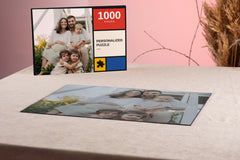
To make a custom puzzle collage, combine your photographs into one finished image before uploading it. GiftMusea's photo puzzle uses one uploaded photo, so arrange the pictures, check every crop, and save the complete collage first. Choose a few clear memories rather than trying to fit your entire camera roll onto the puzzle.
The quickest way is our free photo collage puzzle maker: add your pictures, choose a layout, and order the finished collage as a puzzle in one step. The steps below explain the choices behind a good layout, whichever tool you use.
A collage has two jobs: the finished picture should tell a story, and its smaller sections should offer useful clues while someone assembles it. Start with the puzzle's finished size, then decide how many photographs that space can comfortably show.
1. Choose the size before building your custom puzzle collage
The personalized photo puzzle comes in 99, 500, and 1000 pieces, plus a 100-piece XL option with larger pieces. More pieces do not automatically mean you should add more photographs. Physical picture area and the size of the smallest face are more useful starting points.
| Puzzle option | Finished dimensions | Price | Collage starting point |
|---|---|---|---|
| 99 pieces | 4 x 6 inches (10 x 15 cm) | $29.99 | One main image or two simple photographs |
| 100 pieces XL | 13.5 x 19 inches (34 x 48 cm) | $29.99 | Two to four clear photographs |
| 500 pieces | 13.5 x 19 inches (34 x 48 cm) | $44.99 | Three or four distinct photographs |
| 1000 pieces | 27 x 19 inches (68 x 48 cm) | $64.99 | Four to six photographs, with a clear lead image |
These are layout suggestions, not upload limits or promises about detail. A close portrait may stay readable in a smaller panel, while a distant group can become hard to recognize. The 100-piece XL and 500-piece puzzles have the same finished dimensions, even though their piece counts differ.
The 99-piece option arrives in a clear tube with an aluminium screw cap. The 100-piece XL, 500-piece, and 1000-piece options come in a photo gift box with an optional short message. Compare the activity as well as the presentation in the photo puzzle piece-count guide.
2. Give each photograph a different role
Choose one event, trip, person, or period as the subject of the collage. For a family weekend, you could use a group portrait, a recognizable building, and a close-up of the picnic table. Each image adds something different instead of repeating nearly identical faces in nearly identical settings.
Choose the strongest photograph first and give it the most room. Remove a supporting image if its subject becomes too small at the intended print size. If you need help comparing candidates, use how to choose a photo for a custom puzzle before arranging them.
3. Use a layout that offers solving clues
A simple grid is a useful place to start. Separate a blue harbor scene from a warm indoor portrait or a green garden so each part has a recognizable identity. One large photograph with two or three smaller supporting panels can work when one moment deserves the lead.
Keep spacing between photographs consistent and modest. A visible boundary can help identify where one panel ends, but a wide, plain border creates another area with few picture clues. Avoid filling the collage with large blank bands just to make uneven photographs fit.
Watch for repetition across panels. Several pictures of the same beach, all dominated by blue sky, may be meaningful but provide similar-looking areas. Compare different crops or replace one with a detail from the trip. Your aim is variety that belongs to the same story, rather than unrelated pictures chosen only for their colors.
4. Combine the photos into one image
A free collage tool such as Adobe Express's collage maker can help arrange several images into a grid. Choose a layout that suits the intended puzzle shape, add the photographs, and adjust each crop. Check the tool's current download options before spending time on decorative details.
If you would rather skip the export step, the GiftMusea collage maker arranges your photos in ready-made layouts and adds the finished collage straight to your cart.
For the 99-piece puzzle, plan around a 4 x 6 inch (10 x 15 cm) rectangle. The 100-piece XL and 500-piece puzzles use a 13.5 x 19 inch (34 x 48 cm) rectangle, while the 1000-piece puzzle is 27 x 19 inches (68 x 48 cm). Match the overall proportions rather than starting with a square collage and hoping the edges will fit.
Keep the original photo files and save your editable collage if the tool allows it. Export the finished arrangement as one still image, such as a PNG, and check the puzzle upload guidance for the file you plan to use. Open the exported file separately to make sure you saved the entire collage, not just one selected photograph.
5. Check the smallest panel before uploading
View the complete collage at the approximate size you expect to see on the table. Can you recognize the smallest face without zooming? Are heads, hands, and important landmarks clear of the outside edge? Check each panel, then check the whole rectangle again.
Keep text brief if you add it to the collage itself. Tiny captions under every photograph can turn into marks that are hard to read. For a photo-box option, a short message such as Our summer, piece by piece can introduce the story without using space inside the puzzle image.
Common mistakes and a final checklist
Replace blurry screenshots with original files when possible. Remove near-duplicates, check that no crop cuts through an important face, and reduce empty borders that add little to the image. Increasing the piece count does not restore detail that the original photographs never contained.
Before ordering, confirm the selected piece count, finished dimensions, complete exported image, and any optional box message. Upload the single finished collage rather than the separate photographs. The puzzle uses matte-finish pieces with a tight fit and no glare, so focus your design decisions on the image and the activity you want to give.
FAQ
Can I upload several separate photos for one puzzle?
GiftMusea's puzzle uses one uploaded photo. To include several photographs, combine them into a single image before uploading. Save the original photographs as well as the finished collage, then reopen the export to confirm every panel is present. That final image is the one you use for the puzzle order.
How many photos should a 500-piece collage use?
Start with three or four distinct photographs and check the smallest panel at the finished size of 13.5 x 19 inches (34 x 48 cm). This is a design suggestion, not a product limit. Use fewer pictures if faces become too small or several panels repeat the same colors and scenery.
Should I put a message inside the collage?
You can include a short phrase in the image you create, but check that it remains easy to read and leaves room for the photographs. If you choose a photo gift-box option, the optional short box message offers another place for the greeting. Check the text and the selected option before submitting your order.
Choose your layout first, then explore personalized photo puzzles for the piece count and presentation that fit your story.