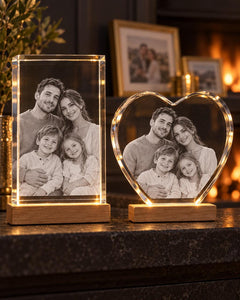
The best photo for a 3D crystal gift is usually the one that makes the person or moment easy to recognize, even before you study the details. That might be a favorite portrait, a candid family scene, or an image of someone you miss. GiftMusea's crystal product uses one uploaded photo, so this choice deserves a few minutes. These simple checks will help you compare the photos you already love and decide which one to upload.
Start with the photo you recognize at a glance
Open two or three contenders in your phone gallery and view each at an ordinary screen size. Do not zoom in yet. Can you immediately tell who or what matters most? Does the expression or gesture that makes the moment special still come through? If a picture only makes sense after someone explains a tiny background detail, it may be less effective as a display gift. A familiar smile against an ordinary backdrop can carry more meaning than a scenic shot in which the person is barely visible.
Now compare emotional value with visual clarity. A polished portrait can look excellent yet feel impersonal to the recipient. A spontaneous image may be beloved but poorly lit. Choose the strongest combination you have rather than chasing either quality alone. For example, among three photos from a graduation, one might show a clear face and genuine joy while still including a hint of the ceremony. That is often a more useful candidate than a distant group image where every face is small.
If you are buying for someone else, think about which photo they would want to see every day. A picture you like is not always the one they would choose. Consider the images they display already, the people or pets they talk about, and whether a surprise photograph might feel too private. The right source image tells a story the recipient wants to keep nearby.
Check light, sharpness, and facial detail
Look at the main face or subject at normal size, then zoom in once. Are the eyes, mouth, or other identifying features distinguishable? Does the source image have motion blur? Is one side of the face lost in deep shadow or blown out by a bright window? These checks help you spot information the file may not contain. A brighter screen setting can make a dark photo easier to view, but it does not add missing detail to the photograph itself.
Phone photos can be good candidates when they are clear and well framed. The device used matters less than what the image actually shows. A recent phone portrait made in open shade may be clearer than an old camera file copied and compressed several times. If the photograph came through a messaging app, look for the original in the camera roll or ask the person who took it for the original file. A screenshot of a small social media post may have less usable detail than the original image.
Heavy filters deserve a second look. A filter that smooths skin or changes contrast may remove the features you want remembered. Compare the edited image with the original if both are available. In a photo of a pet, for example, subtle fur and eye detail may matter more than a dramatic color effect. In a portrait, a natural expression and readable features often carry the memory better than a very stylized edit.
If an image matters deeply and you are unsure whether it is clear enough, contact GiftMusea with your questions before ordering. You can describe the feature you most want to preserve and ask about that particular file.
Leave breathing room around the subject
The crystal product offers heart and rectangular shapes. Neither outline automatically fixes a tight crop. Check the space around the top of a head, a pet's ears, hands, and any object that gives the photo its meaning. If those details already touch the edge of the source frame, a new presentation may leave little room to adjust. A slightly wider original often gives more flexibility than a close crop, even when the close crop looks stronger on a phone screen.
For two people, look for both faces to be visible and separated enough to read as individuals. For a group, compare whether everyone remains recognizable at the size you imagine for the display. The product does not publish a maximum subject count; there is no honest number that guarantees a good result. The question is whether the most important people are clear in the particular photograph you plan to use.
Background can help or distract. A wedding venue, favorite street, or family home may be part of the story. A busy crowd behind a portrait can compete with the subject. If you have several frames from the same moment, choose the one where background details support the memory while the principal face remains easy to find. You do not need a blank background; you need a clear visual priority.
What if the favorite image is imperfect?
Start by finding the best available version. Look in cloud photo storage, an old camera card, or a family member's gallery. The earliest original may be larger or less compressed than an image saved from a chat. If the scene was photographed several times, compare adjacent frames. A one-second difference may replace a blink, a blocked face, or a blurred hand with a clearer version of essentially the same memory.
If there is only one photograph, decide which imperfections matter. A slightly messy background may be acceptable when the expression is unmistakable. A face hidden by motion blur is a more serious limitation if the person is the point of the gift. Digital sharpening can change the appearance of an image, but it cannot reliably recreate detail that was never captured. It is better to ask about a doubtful file than to assume an aggressive edit will solve it.
When you upload the chosen photo to the personalized 3D crystal photo product, you may also add a short line of text or a date. Keep the photo and wording consistent: a meaningful date can add context, while too many words may compete with the image. Before you order, zoom in on the photo and check subject placement, edges, and the spelling of any text or date. Keep in mind that the physical crystal will look a little different as the room light changes.
A quick choice checklist
- At normal screen size, is the main person, pet, or moment clear?
- Are important faces in focus and visibly lit?
- Does the original frame leave room around essential details?
- Does the background help tell the story without taking over?
- Do you have the original file or another frame to compare?
- Would the recipient enjoy seeing this specific moment on display?

Can I use a photo taken on my phone?
Yes, a phone photo can be a candidate. Judge the actual image: clear subject, readable light, and a useful crop. The listing does not state a device requirement or a guaranteed result based on where a photo was taken.
Does a busy background matter?
It can. A meaningful setting may strengthen the memory, but clutter that hides the subject can weaken it. Compare another frame or a closer crop if the eye does not land on the main person quickly.
What should I check before uploading?
Use the original file when possible, verify the faces and edges, and decide whether a short date or line adds value. Then double-check the framing and wording before you place the order.
See the heart, rectangular, size, and LED choices in 3D crystal photo gifts when your image is ready.