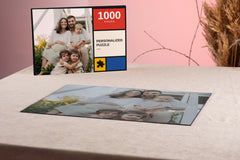
A good photo puzzle begins with a photograph people care about, but emotion is only part of the choice. The image also has to remain understandable when it is scattered across pieces. Before uploading, compare two or three candidates for a clear subject, visible detail, and enough room around what matters. A slightly less dramatic image can make a far better puzzle if people can recognize its faces, colors, and small landmarks as they build.
Start with the moment and its main subject
Ask what the recipient should notice first when the puzzle is complete. In a family portrait, it might be everyone's expression. In a vacation photograph, it could be the two travelers in front of a familiar storefront. In a pet portrait, it might be the look in your dog's eyes. When the answer is clear, you can judge every possible crop against it. If the person or object that gives the photo meaning becomes tiny, choose another frame or move closer within the image.
Imagine two pictures from the same birthday. In the first, the whole room appears: decorations, a table, six guests, and a cake in the corner. In the second, the birthday guest is laughing while a friend brings the cake in. The wide picture has more information, but the closer one may tell the story more directly. The best choice depends on what the recipient remembers. If the gathering itself was the point, keep the group; if that laugh was the moment, let it lead.
Do not confuse a polished pose with a meaningful photograph. A slightly casual image can be wonderful if the faces are clear and the scene is easy to read. Conversely, a professionally composed picture may be hard to assemble if everyone wears similar colors against a uniform backdrop. Look at the image as both a memory and a collection of visual clues. A striped blanket, bright jacket, garden path, or colorful table can help each area feel distinct.
Check focus, light, contrast, and repeated areas
Open each candidate at a larger size and look first at the important faces or objects. If a face is blurry in the original, the puzzle will not magically reveal a crisp expression. Low light can also hide the outline between dark hair and a dark wall. Choose the version in which the subject is easiest to recognize. A bit of shadow can create mood; the problem is when the details that identify the moment disappear into it.

Then scan the rest of the picture. A large plain sky, white wall, or stretch of sand gives fewer differences to use while sorting pieces. That does not make a landscape unsuitable. Clouds, a horizon, changing light, waves, or a person in a colorful coat can create useful landmarks. Compare a beach photo that is mostly empty sky with one that places a friend beside a striped umbrella and the waterline. The second has more distinct regions without losing the vacation feeling.
Contrast does not need to be harsh. You want the subject and background to be distinguishable. A dark dog on a dark sofa may blend into one mass; the same dog beside a lighter blanket may be easier to see. A group wearing black at night can still work if their faces are lit and the setting provides visual variation. Do not reject a beloved image by a rigid rule. Put it next to another shot from the same moment and choose the one that lets you recognize the key details sooner.
Leave room around people and pets
Screen crops can be misleading because a phone fills its display with the image. The puzzle may use a different shape. Compare at least two potential crops before choosing a file. In one version of a couple's photo, their faces sit near the center but an arm extends close to the edge. In a tighter version, the arm disappears. Does that change the story? If it was a hug, it might. Return to a wider original with more space around both people if one exists.
Make the same test with a pet. A close crop may turn an expressive full-body photo into a face-only portrait; that can be lovely if the eyes and ears stay intact. If a favorite toy or the curl of a tail is the detail everyone knows, a wider frame may be better. You cannot assume every photograph will print without cropping, and the product's exact image ratio is not stated in the product details. Keep important features away from the very edges and ask GiftMusea about crop behavior when it is decisive.
For a group, inspect the far left and right people before uploading. It is easy to focus on the person in the middle and miss that someone else's shoulder, hand, or face is nearly outside the frame. For a landscape, check whether moving the crop changes the horizon or removes the place marker, such as a trail sign or distinctive roof. The goal is not empty space for its own sake. It is enough flexibility to keep the scene recognizable.
Review the original before uploading
If you received the picture in a message thread, see whether you can find the original in your photo library or ask the photographer for it. A screenshot can include interface elements, a border, or an accidental crop; a small saved copy may look fine only because the phone displays it small. View the original at full size, zoom into the main faces, and look around the edges for anything you would regret including or losing. The product page does not publish a minimum pixel count. If you are unsure about your file, ask GiftMusea whether it is suitable before ordering.
Make a short comparison list: Which image has the clearest subject? Which has the best balance of light and dark? Which gives different areas of the puzzle recognizable color or texture? Which leaves room around faces, paws, hands, or place markers? Finally, which would the recipient be happiest to see on the printed box? GiftMusea describes matte-finish pieces and a sturdy box printed with the photo, so the image is part of both the activity and the presentation.
Use a photograph you own or have permission to share, especially if it includes other people. A family picture may be meaningful to everyone at the table, but a private moment might be better kept within a smaller circle. Think about who will open the box and see the image. If you want to add a short note, the product details places that optional message on the box along with the photo; it is a separate decision from choosing the image printed as the puzzle.
How to make your own photo puzzle, step by step
Once you have a few candidate photos, ordering the puzzle itself takes only a few minutes.
- Choose the photo. Run the checks above on two or three candidates: a clear main subject, visible detail, and room around faces and edges. Start from the original file, not a screenshot. If you want several pictures in one puzzle, combine them into a single collage image first, because each puzzle uses one uploaded photo.
- Pick the piece count and size. 99 pieces make a small 4 × 6 in (10 × 15 cm) puzzle that ships in a clear tube. 500 pieces and the 100-piece XL option with larger pieces are 13.5 × 19 in (34 × 48 cm), and 1,000 pieces are 27 × 19 in (68 × 48 cm). The piece count guide helps you match the size to the person who will solve it.
- Upload your photo. Open the puzzle collection to order your own photo puzzle, choose the piece option and upload the image. For the sizes that ship in a photo gift box, you can add a short message to the box.
- Review before you order. Open the file you uploaded once more. Check that no face, paw or place marker sits right at the edge, and read any message twice for spelling and dates.
- Production and delivery. Puzzles are usually produced within about two business days, and shipping to the US or within the EU then typically takes around four more days. These are typical times, not guaranteed delivery dates, so order early before a birthday or holiday.
Which photos make the best puzzles?
Kids. A close, bright photo with a colorful outfit or toy gives every area of the puzzle something to find. For young puzzlers, the 100-piece XL option with larger pieces is the easier choice.
Pets. Pick a shot where the eyes are sharp and the fur stands out against the background, such as a dark dog on a light blanket.
Travel. Choose a picture with a recognizable landmark, sign or colorful street rather than mostly sky or sea. Our travel photo puzzle gift ideas have more examples.
Family. A group photo works when every face is lit and nobody is cut off at the edge. For an evening of puzzling together, see our family photo puzzle night ideas.
Common questions about puzzle photos
Can a phone photo work?
Yes, a phone photo can be a good candidate when the important details are clear in the original. Check the full image, not just its thumbnail. Look closely at eyes, expressions, and any text or sign that matters. GiftMusea has not published a universal resolution requirement in the product description, so judge what you can see and confirm technical requirements if you are unsure about a particular file.
How much space should I leave around the subject?
Leave enough that a modest adjustment to the crop would not cut through a face or remove the detail that explains the scene. The needed margin depends on your photo and the final layout. A centered portrait with visible shoulders usually gives more flexibility than a face pressed against one edge. Compare alternate frames from the same moment if you have them.
What if part of the picture may be cropped?
Pick an image with a wider original view, or contact GiftMusea about how your chosen file will be placed before ordering. Do not count on the edges of a screen preview to predict the print exactly. If the edge includes an irreplaceable person or place marker, resolve that question first.
When you have chosen the image, upload your photo for a personalized puzzle and compare the available piece options. You can also browse photo puzzles before deciding how to turn the memory into a gift.